Next-generation industrial software, built for AI
Every PLCGateway product includes a Model Context Protocol (MCP) server, the open protocol AI assistants and agents use to work with tools and data. Most of the work an engineer does in PLCGateway can be done by talking to an AI assistant, with the same roles and rights as people.
What AI can do in PLCGateway
Connect machines
List the supported protocols, create devices, test the connection, add tags with descriptions and units, and read the first values back.
Build screens and reports
Draft process screens and report dashboards from a description, using the plant's own tags and symbols, for people to review.
Model production
Describe the site, define machines for OEE (discrete, continuous or batch) and set up products, then calculate the figures.
Answer questions
Values, history, alarm statistics, batches, OEE and reports, answered in plain language from real data.
Support operations
List and acknowledge alarms, record lab results for batches, and write values within the user's rights.
In your language
The assistant can read PLCGateway's help in the user's language and explain screens and figures.
Ask in plain language
"How many alarms did line 3 have in the last two hours?" becomes an alarm statistics query for that group. "How many kilograms did the jets dye yesterday and what was the right-first-time rate?" is answered from the production model. "Add the Siemens S7-1500 at 192.168.1.20 and its tank level" creates and tests the device and the tag. The assistant first learns what the plant does, its industry and its production unit.
- Works with AI assistants and agents that support MCP
- Over the network or locally on the same machine
- Help texts in the user's language
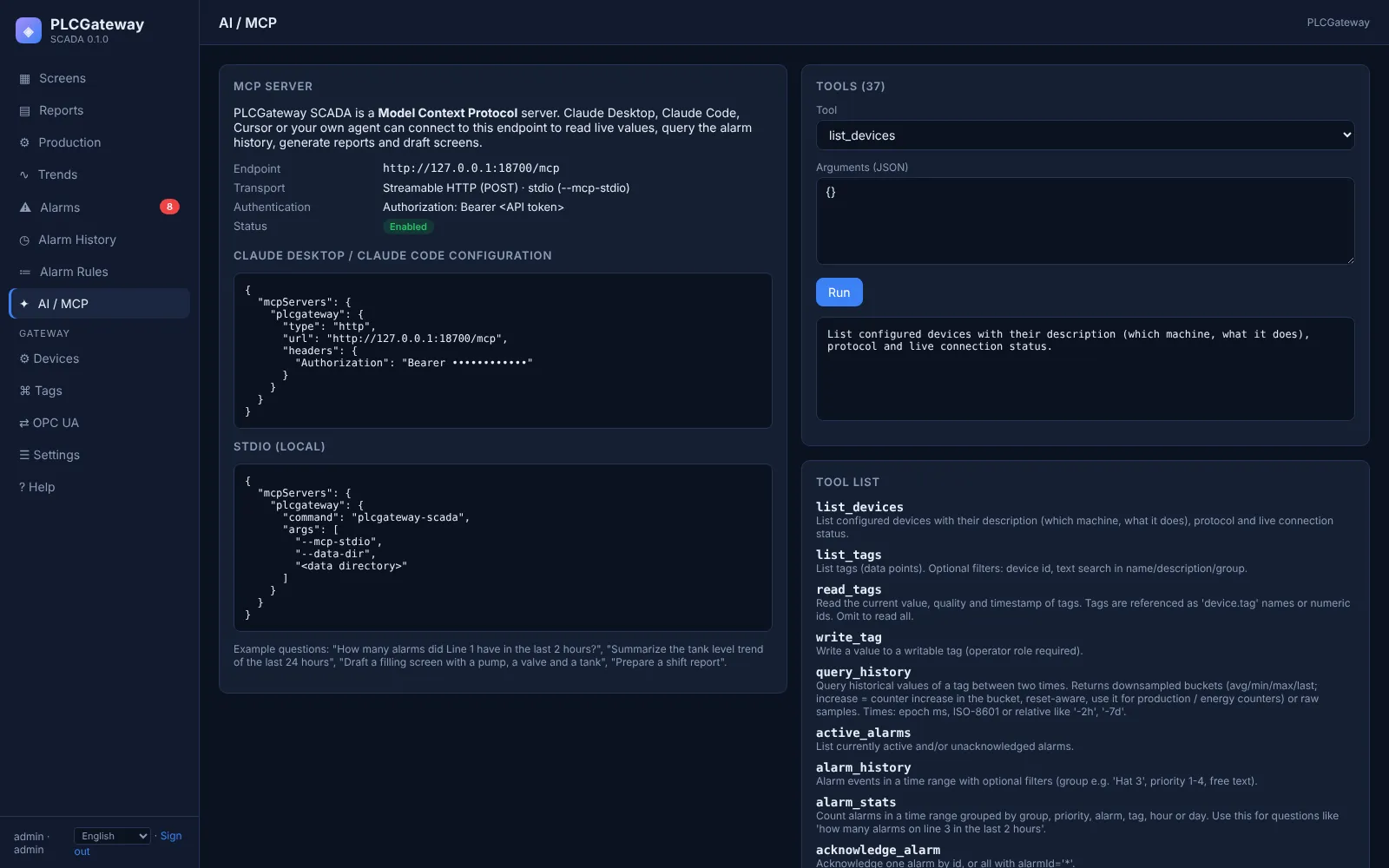
Tools the assistant can use
| Area | Tools |
|---|---|
| Context | get_site_context, system_status, help, list_protocols |
| Data | list_devices, list_tags, read_tags, query_history, write_tag |
| Alarms | active_alarms, alarm_history, alarm_stats, acknowledge_alarm, list_alarm_definitions |
| Production | calculate_oee, list_batches, list_production_assets, get_production_kpis, list_production_batches, set_batch_result |
| Screens and reports | list_screens, get_screen, list_symbols, create_screen_draft, create_dashboard_draft, generate_report |
| Configuration (admin) | set_site_profile, test_device, create_device, update_device, create_tags, update_tags, define_production_asset, define_products, OPC UA certificate actions |
Access under control
Same roles as people
Viewer, operator and administrator rights apply to the assistant; writing values needs operator rights, configuration needs administrator rights.
Separate configuration access
Configuration tools are available only to an administrator session, a local connection or a dedicated configuration token.
Drafts, not surprises
Screens and dashboards created by an assistant are drafts that people review before they go live.
Meaning, not just numbers
Descriptions and units tell the assistant what each value is, so it picks the right signal.
See an assistant work with your data
We will connect an MCP-capable assistant to the demo plant, let it set up a machine and ask your questions live.